Product Updates
New: Daily Wellbeing Summaries
We've made it easier than ever to stay in the loop. Every evening, you'll now receive a concise summary of how your loved one or client's day went — mood, highlights, and anything worth a closer look.
· 3 min read
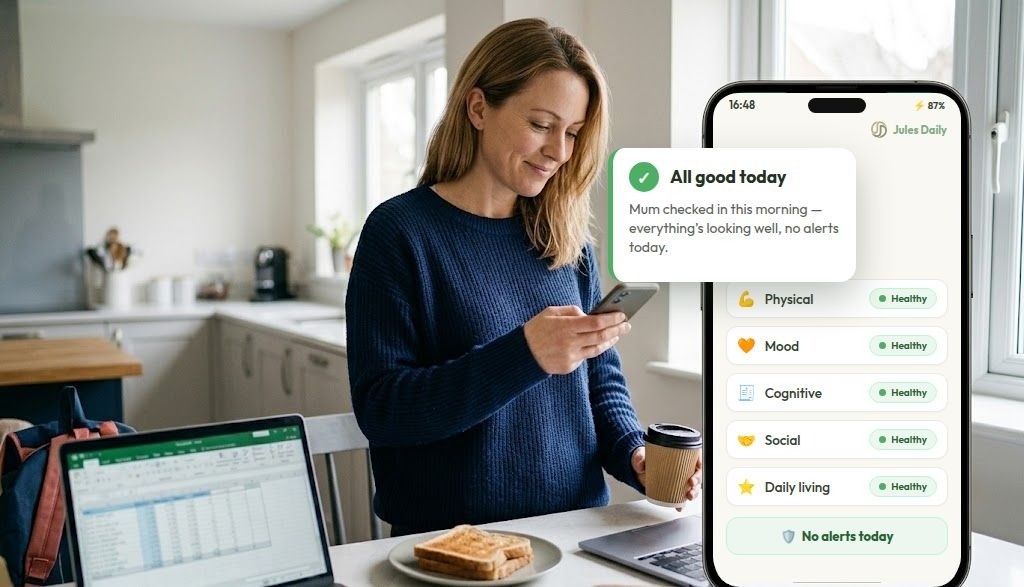
What's in a summary
- Wellbeing scores across five key areas: Physical, Mood, Cognitive, Social, Daily Living.
- An overall sense of their mood that day.
- An alert flag if anything came up that might need a phone call.
The aim is peace of mind without surveillance. Jules never shares the word-for-word conversation — your loved one's chats stay private. Instead, you get the reassurance of knowing they were heard, and a nudge on the days a call would mean the most.
How to turn it on
Summaries are on by default for new members. If you'd like to adjust how and when you receive them, head to your dashboard and open the member's settings.
As always, emergency alerts are separate and immediate — if Jules picks up on something that needs attention now, you'll hear about it straight away rather than waiting for the evening summary.
From today, families and care teams using Jules Daily will receive an end-of-day wellbeing summary — a short, plain-English note about how the member's day went.
What's in a summary
- Wellbeing scores: An update on their wellbeing across five key areas: Physical, Mood Cognitive, Social, Daily Living.
- A concise summary of how they are doing: Any noteworthy changes in scores or particular areas where they might be struggling.
- An alert flag: A clear flag if anything came up that needs attention, or an 'all clear' if everything is fine.
The ultimate aim here is peace of mind without surveillance. Jules Daily never shares word-for-word chat logs — our member's conversations stay completely private and dignified. Instead, you get the quiet reassurance of knowing they were heard, and a helpful head-start on the days a phone call would mean the most.
How to turn it on
Summaries are turned on by default for all new members. If you're an existing helper and would like to adjust how or when you receive these evening notes, simply head to your Helper Dashboard and open the member's settings panel.
🔔 Note on Urgent Alerts: As always, urgent safety alerts remain entirely separate and immediate. If Jules Daily picks up on a critical shift or an unanswered check-in that needs attention now, an alert is sent to you instantly rather than waiting for the evening summary.
- New to the platform? Try Jules Daily Free
- Managing multiple members? View Your Dashboard